Roblox is one of the most-played platforms on the planet, and a Roblox gift card is the simplest way to fund an account without attaching a card or PayPal to it — which is exactly why so many parents buy them for younger players. But there is one detail that trips almost everyone up on their first card: redeeming it does not drop Robux straight into your account. It adds Roblox Credit, and you spend that credit in a second step to buy Robux on the Roblox website. This guide walks you through the official redemption process at roblox.com/redeem, how to convert your credit into Robux, how to claim the free virtual item that comes with the card, and how to fix the errors people hit most.
Roblox Credit vs Robux — the one thing to understand first
A Roblox gift card is not the same as “X Robux in your account”. Redeeming the card gives you Roblox Credit, a prepaid balance held on your account in a set currency (USD, GBP, EUR and so on). From there you decide what to spend it on. Keeping these two things straight explains almost every “where are my Robux?” support question.
Before you redeem
Two quick checks now will save you from the most common failures — both are about matching the code to the right account and a browser.
- Log in to the exact Roblox account you want to fund. Credit is added to whichever account is signed in, and it cannot be moved to another account afterwards.
- Use a web browser, not the app. Roblox gift cards redeem at roblox.com/redeem — the standard mobile app and consoles cannot redeem codes (the Samsung Galaxy Store version of the app is the one documented exception).
- Have the full PIN ready. Scratch the panel gently and read the code carefully — look-alike characters (0/O, 1/I, 5/S, 8/B) cause most “invalid code” errors.
- Know what a foreign card is worth. Roblox Support says every Roblox code can be redeemed worldwide and the value converts to your account’s local currency on redemption, so a card from another country becomes its converted value, not its face value in your currency.
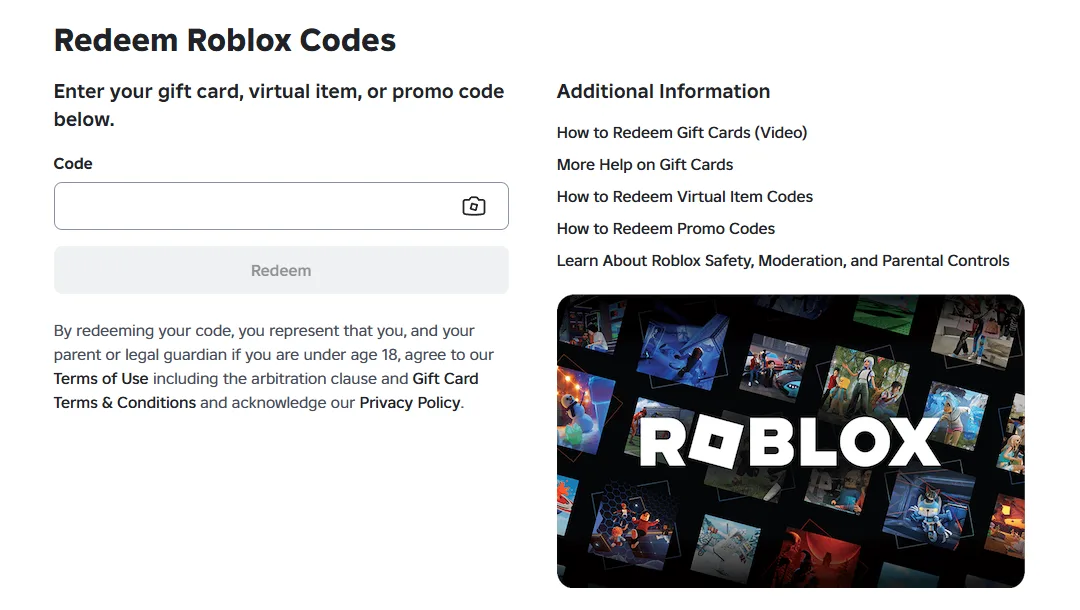
How to redeem your Roblox gift card
This is the official process and it takes under a minute. It works the same from a desktop browser or a mobile browser.
- Go to roblox.com/redeemOpen the page in a web browser. Type the address yourself rather than following a link from an email or message — fake “redeem” pages are a common scam.
- Log in to the right accountSign in as the player you want to fund. Double-check the username shown at the top of the page before you enter anything.
- Enter the PIN from the cardType the code from under the scratch panel (or the digital code from your Virtwave order email) into the box. No spaces or dashes.
- Click “Redeem”A confirmation message appears and the value is added to your account as Roblox Credit. Allow up to five minutes for the balance to update if it does not appear immediately.
Turn your Roblox Credit into Robux
Once the Credit is on your account, converting it to Robux is the second half of the job:
- Click “Get Robux” on the redeem pageStill signed in on roblox.com/redeem, select Get Robux. Roblox Support says this pre-selects the largest package your Credit balance can buy. For a different package, open roblox.com/upgrades/robux instead and pick one there.
- Click “Buy” and confirmThe Robux land on your account and the matching Credit is deducted. You cannot split one purchase between Credit and a bank card, so the whole package has to fit your balance.
- Decide what to do with the restIf Credit is left over, Roblox asks whether you want more Robux. Buy converts more of it; Cancel keeps the rest as Credit for later.
- Convert a small leftoverIf what remains is less than any package, the redemption page shows a Convert Credit to Robux button that turns the remainder into Robux. Roblox does not publish the rate it uses for that conversion.
What your credit buys: the nine website packages
| US price | Website and gift card credit | Mobile app |
|---|---|---|
| $2.99 | 270 Robux | 240 Robux |
| $4.99 | 500 Robux | 400 Robux |
| $9.99 | 1,000 Robux | 800 Robux |
| $14.99 | 1,500 Robux | 1,200 Robux |
| $19.99 | 2,000 Robux | 1,700 Robux |
| $34.99 | 3,625 Robux | 3,150 Robux |
| $49.99 | 5,250 Robux | 4,500 Robux |
| $99.99 | 11,000 Robux | 10,000 Robux |
| $199.99 | 24,000 Robux | 22,500 Robux |
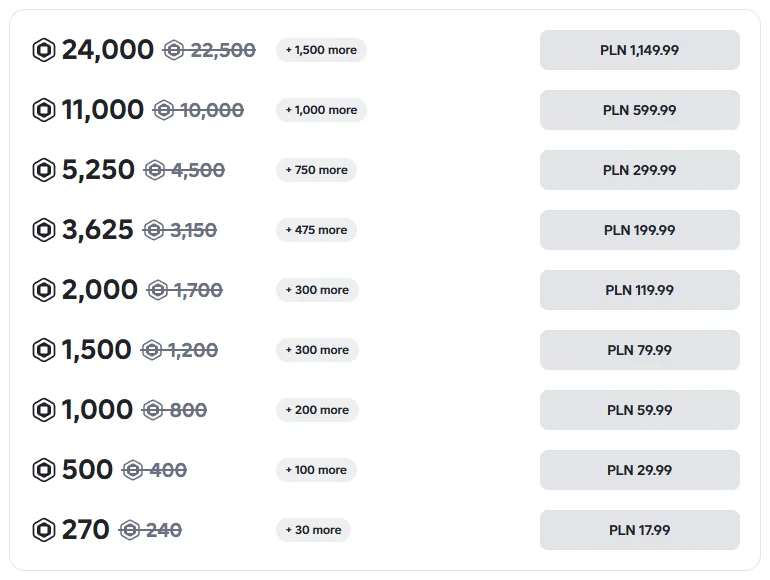
When we opened the Robux page on 17 September 2026 it listed nine packages, three more than when we last updated this guide: Roblox has added 270, 1,500 and 3,625 Robux between the older sizes. Each package showed the smaller app amount struck through next to the website amount, which is the amount gift card credit gets. In the US and Canada, sales tax is added on top at checkout, so a $10 card no longer covers the $9.99 package once tax is included. To see exactly what a card or a budget buys, including tax, use our Robux calculator. For card-by-card answers in other currencies, see how much Robux a Canadian card buys and the same for UAE cards in dirhams.
For the bigger picture — how many people play Roblox every day, how much they spend per region and how much Roblox pays creators through DevEx — see our Roblox statistics report, built from Roblox’s own filings.
Claiming the free virtual item
Nearly every Roblox gift card grants an exclusive virtual item — an avatar accessory or cosmetic — on top of the credit. In most cases the item is added to your account’s inventory automatically when you redeem the code, or a separate item link is provided with the card. Once it is on your account you will find it under Avatar → Inventory, ready to wear. Virtual items are tied to the account that redeemed the card and, like the credit, cannot be transferred to another account.
What Robux can actually buy
Robux is the single currency that works everywhere on the platform, which is what makes a Roblox gift card so flexible:
- Avatar items — clothing, accessories, animations and bundles from the Marketplace.
- In-experience purchases — currency, boosts, skins and gear inside popular experiences like Adopt Me!, Blox Fruits, Grow a Garden and Brookhaven.
- Game passes and private servers — one-off unlocks and your own server for playing with friends.
Region and currency rules
Roblox gift cards are denominated in a specific currency, and that currency decides how much Credit you end up with:
| Check | Why it matters | What happens if it’s wrong |
|---|---|---|
| Currency of the card | Roblox converts the value into your account’s currency on redemption | A foreign card is worth its converted value, which may buy a smaller package than its face value suggests |
| Account you’re signed in to | Credit is added to the active account only | The value lands on the wrong account and can’t be moved |
| Web browser vs app | Codes redeem only at roblox.com/redeem | The standard app shows no redeem option and you assume the card is broken |
Troubleshooting a code that won’t redeem
If Roblox rejects your code, work through this list before assuming the card is faulty. Nine times out of ten it is one of the first two.
- “This code is invalid” or “doesn’t exist”Almost always a typo. Re-enter the PIN with no spaces or dashes and watch for the look-alike characters Roblox Support lists: 0/O, 1/I, 2/Z, 5/S, 6/G or Q, 8/B. Make sure you scratched off the whole panel and read every character, or use the camera button to scan it.
- You’re using the app, not a browserRoblox gift cards do not redeem in the standard mobile or console app. Open a web browser and go to roblox.com/redeem instead.
- “Code already redeemed”Check whether the Credit is already on your account (or a family member’s) from an earlier attempt. Balances can take a few minutes to appear after redeeming.
- Card not activatedA physical card must be activated at the till when it’s bought. Digital codes bought from Virtwave are delivered pre-activated, so this only applies to retail cards — keep the receipt if you bought one in a shop.
- The balance is Credit, not RobuxIf you redeemed successfully but see no Robux, that is expected — the value is sitting as Roblox Credit. Open the Buy Robux page and convert it as described above.
Roblox vs other gaming gift cards
A Roblox card is the right pick when the player lives in Roblox specifically. If they spread their time across PC, console or other mobile games, a different wallet may stretch further.
Frequently Asked Questions
Why didn’t I get Robux when I redeemed my card?
Can I redeem a Roblox gift card in the app?
Do Roblox gift cards or Robux expire?
Can I redeem a Roblox gift card from another country?
What happens to leftover Roblox Credit?
Where is the free virtual item?
My code won’t work — what should I do?
Layla leads the Virtwave content desk. She oversees every blog post before publication, with a focus on long-form gift card guides, payment wallets, and SEO best practice for the gift card industry.
Sources and how we checked this
We re-checked every step in this guide on 17 September 2026 against Roblox’s own pages, opened the redeem page and the Robux page in a browser the same day, and took the screenshots above. Our Roblox gift cards, including US $10 and US $25 cards, are the codes this guide describes. How we research and correct our guides is set out in our editorial policy.
- Roblox Support: How to redeem and spend your Gift Card
- Roblox Support: Managing and spending your Roblox Credit
- Roblox: Redeem Roblox Codes
- Roblox: Buy Robux
- Roblox Developer Forum: Users can enjoy up to 25% more Robux on computer, web and gift cards (26 November 2024)


