How to claim an Amazon gift card in 4 steps
- Sign in to the account that should get the moneyRedeemed balance can never be moved to another Amazon account, so check whose account you are on before you start — this matters most on a shared family laptop.
- Open amazon.com/redeemOr go to Your Account → Gift Cards → Redeem a Gift Card. When we opened amazon.com/redeem signed out on 19 October 2026, it forwarded us to amazon.com/gc/redeem and then straight to the sign-in page, so step 1 is not optional.
- Enter the 14–15 character claim codePhysical cards hide it under a peel-off sticker or a silver scratch panel. Paste digital codes rather than retyping them — 0/O, 1/I and 5/S are the usual typos.
- Select “Apply to Your Balance”The value lands in your Amazon balance immediately and is spent automatically on your next eligible order. If the order costs more, your normal payment method covers the rest.
That is the whole answer to how to claim an Amazon gift card: claiming, redeeming and “activating” are the same single step on Amazon, and it takes under a minute. The exception is an eGift card sent by Amazon itself — it has no claim code at all, just an Apply to your Amazon Account button, which Amazon’s own redemption help page now spells out.
We sell Amazon codes for more than a dozen marketplaces, so the question we answer most is not “how” but “which card”. A $50 Amazon.com gift card (United States) only works on amazon.com; a £25 Amazon.co.uk card only on amazon.co.uk; a €100 Amazon.de card only on amazon.de. Get that right and nothing below will ever be needed.
How do you activate an Amazon gift card? You don’t
| What people search | What Amazon calls it | What actually happens |
|---|---|---|
| How to claim an Amazon gift card | Redeem a Gift Card | You enter the claim code and the value moves into your Amazon balance |
| How do you activate an Amazon gift card | Redeem a Gift Card | Same screen — there is no separate activation step on Amazon’s side |
| How to apply an Amazon gift card | Apply to Your Balance | The button at the end of redeeming, or the Apply button at checkout |
| How to use an Amazon eGift card | Apply to your Amazon Account | A button in the email or text — no code to type |
Amazon’s gift card terms also say plainly that no fees apply to gift cards. So if anyone tells you a card must be “activated” for a fee, or asks you to read the code out over the phone so they can activate it, you are talking to a scammer, not Amazon.
Cards bought in a shop: activation happens at the till
The only real “activation” is done by the retailer when you pay for a physical card in a supermarket or petrol station. If a freshly bought card is refused, the till step is the first thing to check — take the card and the receipt back to the shop, because Amazon cannot activate a card the store never activated. Digital codes, including the ones we deliver by email, are already live when you receive them.
Where is the claim code on an Amazon gift card?
Physical cards
Remove the card from its outer packaging first — Amazon notes that the card inside is credit-card sized. The claim code is on the back, under the peel-off sticker or the silver scratch-off section. It is 14 or 15 characters and usually mixes letters and numbers. Use a fingernail, not a coin: if you scratch the code away, Amazon can still help, but you will need the 16- or 30-digit serial number printed on the back of the card, according to its Gift Card Redemption Issues page.
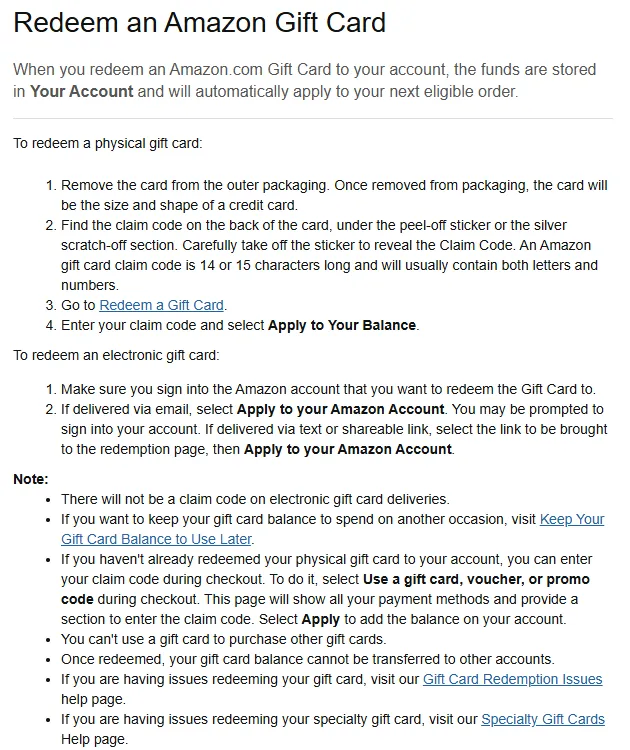
Amazon eGift cards have no claim code
“There will not be a claim code on electronic gift card deliveries.”
— Amazon.com Help, Redeem an Amazon Gift Card, read 19 Oct 2026
This is the change most guides still miss, ours included until this update. An eGift card bought on Amazon and sent by email arrives with an “Apply to your Amazon Account” button; one sent by text or shareable link takes you to a redemption page with the same button. You sign in and press it — there is nothing to copy. If someone sends you a “claim code” and says it came from Amazon’s own eGift email, be suspicious. If you lose the email, Amazon’s fix is to resend the digital gift card, not to dig out a code.
Codes bought from a reseller
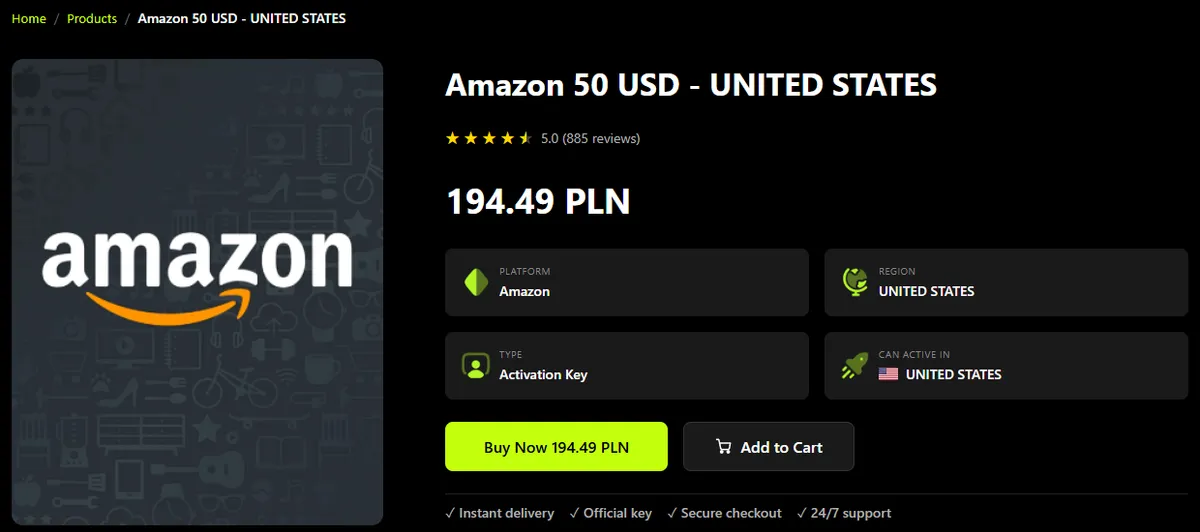
Codes sold by authorised resellers such as Virtwave are different: you do get a typed claim code in your order email, and you redeem it at amazon.com/redeem exactly like a physical card. Before you buy, look at the region. On our product pages the “Region” and “Can active in” fields show which marketplace the code belongs to — on 19 October our $25 US Amazon card and the $50 one both read “United States” in both fields.
Redeem on the website, in the app, or at checkout
| Route | Where | Best when |
|---|---|---|
| Website | amazon.com/redeem → Apply to Your Balance | You just received the card and want the balance waiting in your account |
| Amazon app | Menu → Account → Gift Cards → redeem | You are on your phone and the code is in an email on the same phone |
| Checkout | Payment page → “Use a gift card, voucher, or promo code” | You are mid-purchase with a physical card in hand |
In the Amazon app
- Open the Amazon Shopping app and make sure you are signed in to the right account.
- Tap the menu, then Account, then Gift Cards — your current balance shows here.
- Choose to redeem a gift card, type or paste the claim code, and confirm.
- The new balance appears on the same screen, ready for your next order.
At checkout
If you have not redeemed a physical card yet, you can do it on the payment page: select “Use a gift card, voucher, or promo code”, enter the claim code and select Apply. Amazon adds the value to your account balance and uses it on that order; anything left over stays in the balance for next time.
Saving the balance for later
Because redeemed balance applies itself to the next eligible order, people sometimes spend a birthday card on toothpaste by accident. To keep it for a bigger purchase — a controller, a console, a new game — select Change where the gift and promotional balance shows at checkout and untick “Use your … Gift and promotional balance”. The balance stays put until you tick it again.
How do I claim an Amazon gift card?
How do you activate an Amazon gift card?
Why is there no claim code on my Amazon eGift card?
Do Amazon gift cards expire?
Can I use my Amazon gift card on another account?
Why does my Amazon gift card say it has already been redeemed?
Marketplaces: why a correct code still gets rejected
Amazon is a set of national stores, each with its own currency and its own balance, and a card belongs to exactly one of them. Amazon’s US help is blunt about it:
“Amazon.com Gift Cards can only be used on Amazon.com.”
— Amazon.com Help, Gift Card Redemption Issues, read 19 Oct 2026
Point a US card at amazon.co.uk and it is refused — not because it is fake or used, but because dollars and pounds are separate pots that Amazon will not convert. The Amazon.com gift card terms go further: the balance cannot be applied at any Amazon property outside the United States. The same logic runs through every brand we sell, which we unpack in gift card regions and country locks explained. For Japan specifically, see how to buy and redeem an Amazon Japan gift card in yen.
| If your address bar says | Buy a card for | Currency | Example in our store |
|---|---|---|---|
| amazon.com | United States | USD | $10, $25, $50, $100 |
| amazon.co.uk | United Kingdom | GBP | £5, £25, £50 |
| amazon.de | Germany | EUR | €10, €100 |
| amazon.ca | Canada | CAD | CA$5, CA$10, CA$50, CA$100 |
| amazon.ae | United Arab Emirates | AED | AED 100 |
| amazon.co.jp | Japan | JPY | ¥1,000, ¥10,000 |
Shopping on amazon.ae? Our AED 100 Amazon.ae gift card is the one that works there. The same card bought for amazon.com would simply be refused.
What an Amazon balance buys for gamers
The rule that surprises gamers most is the second-to-last one: you cannot turn an Amazon balance into a Steam or Xbox card on Amazon, because the terms bar buying gift cards with gift card balance. Buy the card you actually want directly — for PC that is a $50 Steam gift card (US), and our Steam gift card guide covers redeeming it. Subscriptions are the useful exception: Amazon’s help page on Prime Video add-ons says US customers can pay for Prime and add-on channels with gift card balance, and leftover balance covers the following periods. For streamers, Twitch sells its own cards — see how to redeem a Twitch gift card — and our wider guide to paying for subscriptions with gift card balance compares the other services.
Fixing an Amazon gift card that does not work
| What you see | Likely cause | What to do |
|---|---|---|
| Code refused, but you typed it right | Wrong marketplace (a .com card on .co.uk, .de, .ae…) | Redeem on the store the card was issued for |
| “Invalid claim code” on a new card | A misread character | Re-check 0/O, 1/I, 5/S, or paste from the email |
| Code scratched off or unreadable | Damaged card | Contact Amazon with the 16- or 30-digit serial number on the back (and order number if bought on Amazon) |
| “Already redeemed” | Applied to an account before — maybe yours | Check Your Gift Card Balance first; Amazon keeps it there for future orders |
| Applied to the wrong account | Signed in as someone else | Balances cannot be moved between accounts — check sign-in before redeeming |
| eGift email lost | Deleted or never arrived | Use Amazon’s Resend a Digital Gift Card option |
| Brand-new card refused in a shop | Not activated at the till | Return to the store with the receipt |
The numbers behind that warning are in our gift card scam statistics report, built from FTC data: US consumers reported losing $233.4 million through gift cards in 2025.
Amazon gift card for a gamer
The most flexible card for buying gaming gear, and the easiest to redeem: one screen, no activation, no expiry. Its weak spots are all rules, not technology — one marketplace, no transfers, and no buying other gift cards with it.
- Redeems in under a minute
- Balance never expires
- Pays for Prime and Prime Video add-ons in the US
- Locked to one country’s Amazon store
- Cannot buy Steam, Xbox or other gift cards
- Cannot be moved to another account once redeemed
Sources & how we checked this
We re-read every Amazon help page below on 19 October 2026 in a browser set to amazon.com, opened amazon.com/redeem signed out to see where it leads, and checked the region fields on our own Amazon product pages the same day. Product availability is from the Virtwave catalogue on that date. Our process is described in the editorial policy.
- Amazon.com Help — Redeem an Amazon Gift Card
- Amazon.com Help — Gift Card Redemption Issues
- Amazon.com Balance and Amazon.com Gift Card Terms and Conditions (last updated 7 March 2025)
- Amazon.com Help — Keep Your Gift Card Balance to Use Later
- Amazon.com Help — Paying for Prime Video Add-On Subscriptions with Gift Cards
Layla leads the Virtwave content desk. She oversees every blog post before publication, with a focus on long-form gift card guides, payment wallets, and SEO best practice for the gift card industry.


