To do an HSR top up, use the in-game Shop, the PS5 PlayStation Store, or the official HoYoverse Honkai: Star Rail Top-Up Center. All three sell Oneiric Shards, which convert 1:1 into Stellar Jade for warps. The web top-up center needs the same HoYoverse login as the game account you are topping up. To pay from a gift card balance, redeem a Google Play or Apple card first and buy in-game.
HSR top up at a glance
| Route | Where you start | How you pay | Watch out for |
|---|---|---|---|
| Honkai top-up center (web) | hsr.hoyoverse.com/payment | Card, PayPal, regional methods | Log in with the same account as your game UID |
| In-game shop (mobile) | Phone menu → Shop → Oneiric Shards | Google Play / Apple balance | App-store price; card region must match your store |
| PS5 / PS4 | PlayStation Store add-ons | PSN wallet | Paid shards stay with the PlayStation store |
Oneiric Shards vs Stellar Jade — get this straight first
New players routinely buy shards and then wonder why the warp screen still will not let them pull. The reason is that you never spend the currency you buy directly on banners — you convert it first.
How much a warp actually costs
Before you decide on a tier, it helps to know what you are buying in warps rather than in shards. Limited character banners in Star Rail have soft pity in the mid-70s and a hard pity at 90 warps, with the 50/50 rule meaning a worst case of 180 warps for a guaranteed limited five-star. Doing the arithmetic in advance is the difference between a considered purchase and an expensive impulse.
| Target | Warps | Stellar Jade needed |
|---|---|---|
| A single pull | 1 | 160 |
| A ten-pull | 10 | 1,600 |
| Guaranteed five-star (hard pity) | 90 | 14,400 |
| Guaranteed limited five-star (lost 50/50) | 180 | 28,800 |
The six tiers and the first-time double bonus
Oneiric Shards sell in six fixed tiers. The part that matters financially is the First Purchase Double Bonus: the first time you buy a given tier, the shards are doubled. It is once per tier, so if you know you are going to spend a set amount, buying each tier once beats repeating a small pack — a repeat purchase pays full price for half the shards. Note that the smaller tiers include a modest extra even on repeat buys, which is why the "top up" and "receive" numbers differ below.
| Tier | Repeat purchase gives | First purchase gives |
|---|---|---|
| 60 | 60 | 120 |
| 300 | 330 | 600 |
| 980 | 1,090 | 1,960 |
| 1,980 | 2,240 | 3,960 |
| 3,280 | 3,880 | 6,560 |
| 6,480 | 8,080 | 12,960 |
Every official way to top up
There are four legitimate routes. They differ in how you pay, what they cost, and — importantly — which platform balance the shards land in.
| Method | Where | Pay with | Best for |
|---|---|---|---|
| In-game shop (mobile) | Phone menu → Shop → Oneiric Shards | Google Play or Apple gift card balance | Android & iOS players |
| In-game shop (PC) | The shop in the HoYoPlay / PC client | Card, PayPal and regional methods | PC players |
| PlayStation Store | The Star Rail add-ons page on PS5/PS4 | PSN wallet — top it up with a PlayStation gift card | Console players |
| Official web top-up center | The HoYoverse payment page for Star Rail | Card, PayPal and regional methods | Often cheaper than mobile; needs your UID |
How to top up in-game on mobile
- Open the ShopLaunch Honkai: Star Rail, open the Phone menu (top-left), tap "Shop", then the "Oneiric Shards" tab.
- Pick your tierChoose one of the six packs. Any tier you have not bought before shows the doubled first-purchase total right on the card, so it is obvious which bonuses are still available.
- Confirm through your app storePayment goes through Google Play on Android or the App Store on iOS. This is where a redeemed gift card balance is spent — no card details needed if your store account already has funds.
- Convert only what you needShards arrive instantly. Open the warp screen and convert the exact number of Stellar Jade you want for the banner you are pulling; leave the rest as shards until the next one.
HSR top-up center website: how to top up step by step
The HoYoverse web top-up center is worth knowing about because it usually undercuts the in-game mobile price — mobile prices carry the app-store cut, the website does not. You buy on the site and the shards appear on your account.
- Note your UID firstIn-game, open Settings → Account → User ID (it is also shown in the bottom corner of the main menu). Note it down before you leave the game, so you can check it against the account the site lists.
- Open the official payment pageGo to hsr.hoyoverse.com/payment and press Log In (step 1 of 3). The page asks you to sign in with the HoYoverse account you play on. Only use the official HoYoverse page, never a third party asking for your login.
- Select User: server and UIDStep 2 of 3 is Select User. Choose the server (America, Europe, Asia or TW/HK/MO), then confirm the UID shown matches the one you noted. This is the single most important check on the page.
- Pick a pack and payChoose a shard tier, the Express Supply Pass or Nameless Glory, then pay by card, PayPal or a supported regional method. Delivery is usually within moments; log out and back in if the shop has not refreshed.
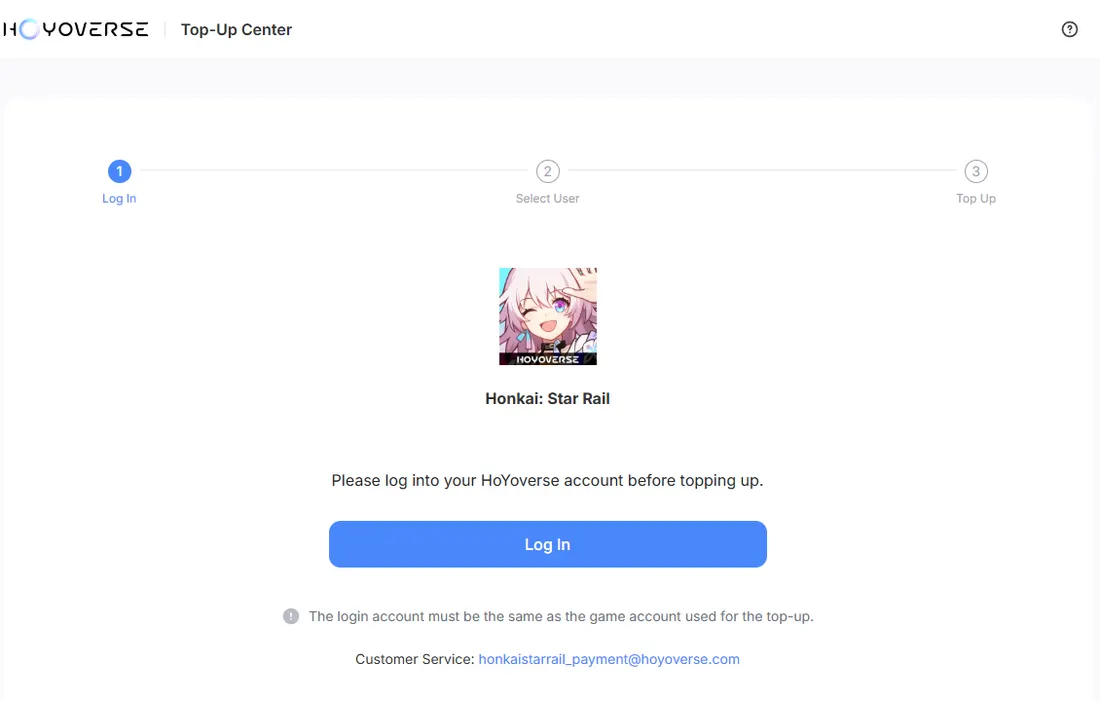
“When we opened the top-up center on 30 September 2026 it showed a three-step flow, Log In, Select User, Top Up, and a note that the login account must be the same as the game account used for the top-up. We stopped at the login screen and did not make a purchase, so the pack list and prices below come from the in-game shop and HoYoverse's own documentation, not from a checkout we completed.”
— Rayyan Omar, From our checks, 30 September 2026
How to top up on PS5
On PlayStation, Oneiric Shards are sold through the PlayStation Store from inside the game, and the payment comes out of your PSN wallet balance. Link your PSN account to your HoYoverse account first, open the shop from the in-game menu, and pick a tier. Remember that paid shards stay with the PlayStation store, so convert them to Stellar Jade on the console before you expect to use the value elsewhere.
What to buy first
If your budget is fixed, the order you spend it in matters more than the amount. Here is how the three main paid options compare for a typical player.
Express Supply Pass
The cheapest paid item in the shop and the best Stellar Jade per dollar in the game: 300 Oneiric Shards the moment you buy, then 90 Stellar Jade every day you log in for 30 days — 2,700 Jade over the month, close to 19 warps once you add the initial shards.
- Best value per dollar by a wide margin
- Instant 300 shards on purchase
- Can be stacked ahead of time
- You must log in daily to claim the 90 Jade
- Does not auto-renew
- Cannot stack beyond 179 days of remaining time
Nameless Glory (Battle Pass)
Good value across a full version if you actually play: it upgrades the free Nameless Honor track, grants Stellar Jade outright, and pays out passes, credits and upgrade materials as you level it. Dead weight if you log in twice a month.
- Stellar Jade plus warp passes and materials
- Rewards play you were doing anyway
- Needs the pass levelled to pay off
- Resets every version
Oneiric Shard packs
The direct route when you need Jade now. Take every tier's first-time double bonus while it lasts; repeat purchases at full price are the least efficient spending in the game.
- Instant Jade for a live banner
- Doubled on the first purchase of each tier
- Poor value on repeat buys
- No ongoing rewards
The platform-wallet rule console players miss
This is the part that generates the most confused support tickets. Linking your PSN account to your HoYoverse account shares your progress, your characters and your earned Stellar Jade across PC, mobile and PS5 — that part works exactly as advertised. Paid Oneiric Shards behave differently: they sit in a balance associated with the storefront that sold them. Buy shards on PS5 and open the game on your phone the same evening, and the shard balance can look untouched.
- Stellar Jade — earned or converted — follows your account and is available on every linked platform.
- Oneiric Shards are tied to the store where the purchase was made, so buy them where you actually play.
- Converting shards to Stellar Jade is what makes that value usable everywhere, which is another argument for converting on the platform you bought on.
- Purchases still require the platforms to be linked before the account itself is shared — link first, buy second.
Before you top up
- You have checked your existing Stellar Jade, mail and unclaimed event rewards — you may need less than you think.
- You know which banner you are pulling on and when it ends. Version 4.6 (Dance With the Beast Before Moonrise) went live on 27–28 September 2026, so check the in-game event page for the exact end time of each banner.
- You are logged into the correct account, server and UID — top-ups cannot be moved afterwards.
- Your gift card region matches your app store or PSN account region.
- You are buying on the platform you actually play on, because paid shards stay with that store.
- If the tier still has its first-time double bonus, you are claiming it rather than repeating a smaller pack.
Troubleshooting a top-up
| Problem | Likely cause | How to fix it |
|---|---|---|
| Payment fails on mobile | Gift card region does not match your store region | Match your Google Play / App Store country to the card, then retry |
| Shards bought on PS5 missing on mobile | Paid shards stay with the store that sold them | Open the game on the platform you bought on and convert to Stellar Jade there |
| Shards never arrived from the web center | Wrong UID or wrong server selected at checkout | Check the receipt against your in-game UID; shards stay on the account you chose |
| No first-time double bonus showing | That tier has already been claimed | It is once per tier and only refreshes at major version or anniversary resets |
| Jade did not increase after buying shards | Shards are not Jade until you convert them | Open the warp screen and convert the amount you need — the exchange is 1:1 |
| Express Supply Pass will not let you buy again | You already hold 179 days or more of pass time | Wait until the remaining time drops below the cap, then re-buy |
Frequently Asked Questions
What is the difference between Oneiric Shards and Stellar Jade?
How do I top up Honkai: Star Rail on my phone?
Can I use a Google Play, Apple or PlayStation gift card to buy Oneiric Shards?
Is the Express Supply Pass worth it?
Does the first-time top-up bonus reset?
Why can I not see my Oneiric Shards on another device?
How much does a guaranteed five-star cost?
What is the HSR top-up center?
Is the Honkai top-up center the official HSR top up website?
Is a Hoyo top up for HSR the same as for Genshin Impact?
How do I buy HSR jade?
Does the HSR top up bonus reset?
What is the cheapest way to top up?
Sources & how we checked this
- Honkai: Star Rail | HoYoverse Official Top-Up Center: opened 30 September 2026 (start page and three-step flow only).
- HoYoverse announcement: Version 4.6 "Dance With the Beast Before Moonrise".
- Gematsu: Version 4.6 launch coverage (used to confirm the 27–28 September 2026 launch).
- Honkai: Star Rail official site.
Method: we checked the official pages above on 30 September 2026. We did not complete a purchase for this update; shard tiers, bonuses and pass values are as previously verified in the in-game shop and can change with any version, so confirm the numbers on the card before paying. How we work is described in our editorial policy. Related reading: Genshin Impact Genesis Crystals top-up and how to redeem a Google Play gift card.
Rayyan covers console and PC gaming wallets for Virtwave, with deep specialism in PlayStation Network, Xbox, Razer Gold and Steam. He has been writing about digital gaming commerce since 2020.


