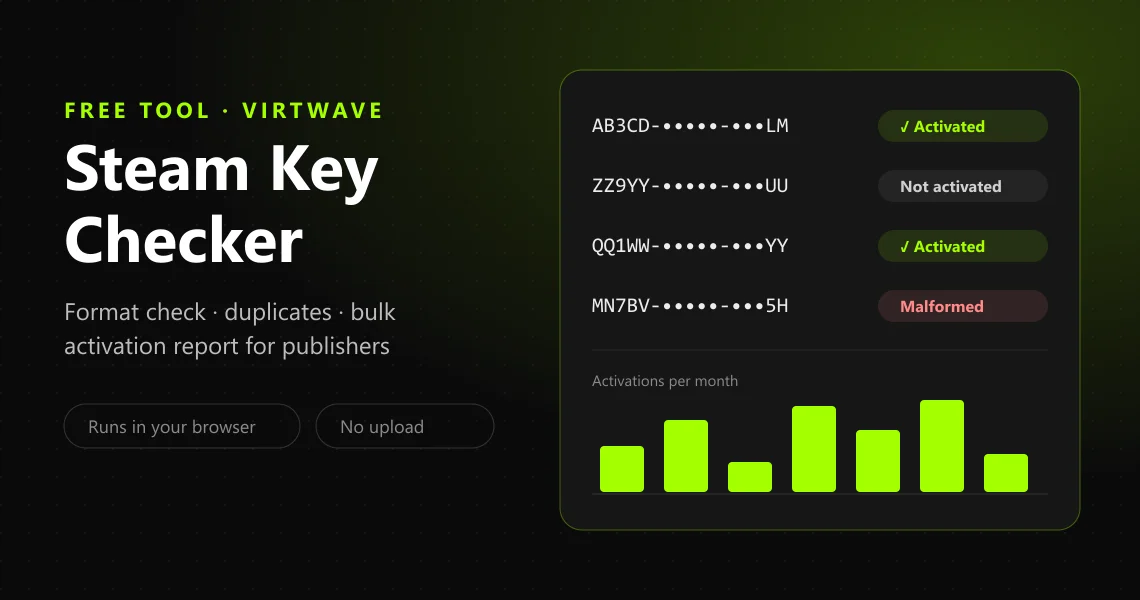
The Virtwave Steam Key Checker: masked Steam keys marked activated, not activated or malformed, above a bar chart of activations per month

Free tool · Steam keys · No upload

Steam Key Checker

A Steam key checker can tell you whether a key is in a format Steam accepts, clean up a messy list and catch duplicates. What no website can tell you — this one included — is whether a key has already been redeemed: Valve allows that lookup only inside Steamworks, for the publisher who generated the key. This free tool does both halves honestly. Anyone can check and clean keys in bulk; publishers get an activation report built from their own Steamworks session. Nothing leaves your browser.

By , Data & Market Research LeadFigures checked by Rayyan OmarRates verified

Keys never leave this tab. Nothing is uploaded, stored or logged — reload and it is gone.

Check and clean a list of Steam keys

Paste keys one per line, or load a .txt or .csv export — the key can sit in any column, and other columns (channel, country, order number) are kept. Everything runs in this browser tab: no key is sent to Virtwave or anyone else.

Keys are masked on screen by default, so a screenshot or a stream does not give them away. “Open in Steam” uses the widely used registerkey?key= link, which Valve does not document — if the box arrives empty, paste the key in.

  • Who can see if a key was usedIts publisherin Steamworks, and only for keys from their own batches
  • Keys Steamworks checks per lookup1this tool batches them — up to 500 per run
  • Key formats Steam lists3in its own Activate a Product dialog

What a Steam key checker can — and cannot — tell you

The honest answer to “is this key used?” depends entirely on who is asking. This is what each of them can actually find out.

What a buyer, the publisher in Steamworks and this checker can each see, per Valve’s documentation as of 24 September 2026.
QuestionAnyone holding a keyPublisher in SteamworksThis checker
Is the key in a format Steam uses?YesYesYes, in bulk
Duplicates, typos, stray spaces and dashesBy handBy handYes, automatically
Has the key been activated?Only by redeeming itYes, one key at a timeYes, in bulk — publishers only
When was it activated?NoYesYes, charted by month
Which package or key tag it belongs toNoYesYes, grouped
Which country it was activated inNoIn aggregate onlyBy the channel or country you sent it to
Whether it is region-lockedOnly by redeeming itFrom the packageNo

Valve is explicit about the publisher column. Its Steam Keys documentation says “you can query only a single key at a time”, that only accounts with the “Generate Steam Keys” permission may do it, and that a key from someone else’s batch simply comes back as invalid. That is why every genuine activation checker — ours, and the paid browser extensions — runs inside the publisher’s own Steamworks session. A site that offers to check any key against Steam for anyone is claiming something Valve does not provide.

What a Steam key looks like

Valve never describes the format in prose. The only statement is the list of example codes in the Steam client’s own Activate a Product dialog — so that is exactly what this checker accepts.

  1. AAAAA-BBBBB-CCCCCSteam key (AAAAA-BBBBB-CCCCC)
  2. AAAAA-BBBBB-CCCCC-DDDDD-EEEEE25-character product code
  3. 237ABCDGHJLPRST 23Older retail format (15 + 2)

Those three are quoted from the client’s text (“Keys look like the following”), which you can read in the Steam client strings. The 25-character form is the one Valve says boxed games print, “on the DVD jewel case, manual cover, disc insert or inside the case”. What Valve does not document: the character set, whether keys are case-sensitive, or a checksum. A key can therefore have a perfect shape and still be fake or used — format checking catches typos and the wrong kind of code, nothing more.

When a key is typed from a card or box, these are the characters Valve says people confuse. The checker lists the ones in your keys when you tick “I typed these by hand”.

  • 0try O, Q, D
  • 1try I, L
  • 6try G
  • 8try B
  • Otry 0, Q, D
  • Vtry Y
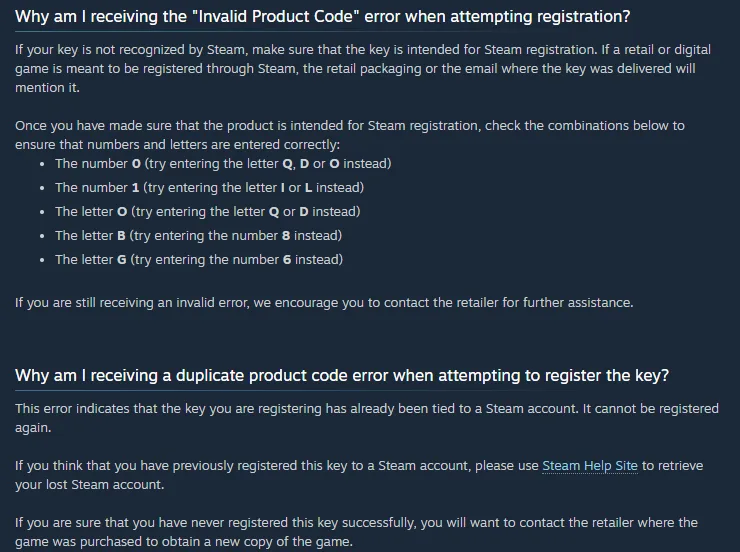
Steam Support’s Retail CD Keys page explaining the Invalid Product Code error, with Valve’s list of characters to try instead — 0 for Q, D or O, 1 for I or L, O for Q or D, B for 8, G for 6 — and the duplicate product code error, which says the key has already been tied to a Steam account and cannot be registered again
Steam Support’s Retail CD Keys page, captured by Virtwave on 24 September 2026: Valve’s own look-alike list, and its answer for a duplicate key — “It cannot be registered again.”

Steam activation errors, decoded

Every message below is Valve’s own wording, taken from the Activate a Product page on 24 September 2026 — with what it means and who has to fix it.

Type a few words of the message Steam showed you. Each entry says what the error means, whose problem it is, and what to do next.

10 errors.

The product code you've entered is not valid or is not a product code. Please double check to see if you've mistyped your key. I, L, and 1 can look alike, as can V and Y, and 0 and O.

What it means
Steam headlines this “Invalid Product Code”. Either the key was mistyped, or it is not a Steam product key at all — a Steam Wallet code, a key for another launcher, or a code for another store. Valve: “If a key is not intended for registration through Steam, you will see an Invalid Product Code error.”
What to do
Paste the key into the checker above and tick “I typed these by hand” to see which characters Valve says get confused. If it came on a Steam gift card, redeem it on the wallet page instead. If it still fails, Steam’s own advice is to go back to the seller: Steam Support cannot replace a key another company sold you.

Source: Steam Support — Retail CD Keys

The product code you've entered has already been activated by a different Steam account. This code cannot be used again. Please contact the retailer or online seller where the code was purchased for assistance.

What it means
Steam headlines this “Duplicate Product Code”. The key has been redeemed on another account, and a Steam key is single-use. Valve: “It cannot be registered again.”
What to do
Contact the seller for a replacement or refund — Valve’s wording is that Steam Support “cannot issue a replacement CD key”. Keep the order number and a screenshot of the message.

Source: Steam Support — Retail CD Keys

This Steam account already owns the product(s) contained in this offer. To access them, visit your library in the Steam client.

What it means
The key is for something already in your library. Valve does not document whether a key is used up by this attempt — so do not assume it can still be given away.
What to do
If you meant it as a gift, have the other person try it on their own account. If you bought it by mistake, ask the seller before anyone redeems it anywhere.

Source: Steam Store — Activate a Product on Steam (the page, and the error messages its script shows)

There have been too many recent activation attempts from this account or Internet address. Please wait and try your product code again later.

What it means
Steam headlines this “Too Many Activation Attempts”. Steam rate-limits key activations per account and per internet address. Valve does not publish how many attempts are allowed or how long the lock lasts; the “one hour” you will read elsewhere is not from Valve.
What to do
Stop trying and come back later. Check your keys here first, so the attempts you do make are on keys that at least have a valid format.

Source: Steam Store — Activate a Product on Steam (the page, and the error messages its script shows)

This product code cannot be activated in your region.

What it means
The key is region-locked. The store shows it as “Sorry, but this product is not available for purchase in this country. Your product key has not been redeemed.” Valve: “Region restrictions on CD Keys vary by each individual publisher.”
What to do
Ask the seller for a key for your region or a refund — Valve says “Steam Support is unable to modify or remove any region restrictions”, and using a VPN to disguise your location “is strictly against the Steam Terms of Service and may result in restrictions on your Steam account.”

Source: Steam Support — Region Restrictions on Steam

Game not available in your territory

What it means
Valve’s Region Restrictions FAQ gives this as the error “if you have purchased a regionally restricted copy of a game and you try to register its CD Key in a different region.” It adds: “If you do not live in the designated region for that game you must contact the seller for a refund.”
What to do
The same as for a region-locked key: the seller, not Steam Support, has to sort it out.

Source: Steam Support — Region Restrictions on Steam

The product code you've entered requires ownership of another product before activation. If you are trying to activate an expansion pack or downloadable content, please first activate the original game, then activate this additional content.

What it means
The key is for DLC or an expansion, and the account does not own the base game yet.
What to do
Activate or buy the base game on the same account first, then redeem the DLC key again.

Source: Steam Store — Activate a Product on Steam (the page, and the error messages its script shows)

An unexpected error has occurred. Your product code has not been redeemed. Please wait 30 minutes and try redeeming the code again. If the problem persists, please contact Steam Support for further assistance.

What it means
A generic failure. Note that the “30 minutes” here is Valve’s advice for this error only, not the length of the too-many-attempts lock.
What to do
Wait 30 minutes as Valve says, then try once more. If it keeps happening with a key that checks out here, contact Steam Support.

Source: Steam Store — Activate a Product on Steam (the page, and the error messages its script shows)

The CD Key you used to activate the game was revoked by the publisher of the game.

What it means
A game you activated has disappeared from your library. Valve: this can happen “when the CD Key is intended for a limited time activation, like a Beta, or if the publisher determines that the CD Key itself had been obtained by fraudulent means.”
What to do
Valve says “Your account will not be restricted; however, the CD Key you received will be removed”, and that it has “no way to issue refunds for purchases made outside of Steam” — so the refund has to come from the seller.

Source: Steam Support — Revoked CD Keys

The Steam Wallet code you have entered has already been redeemed. Steam Support is unable to issue you a new code.

What it means
This one is for Steam Wallet codes and gift cards, not game keys — they are redeemed on a different page. The code has been used.
What to do
Go back to the seller of the card or code with your receipt.

Source: Steam Store — Redeem a Steam Gift Card or Wallet Code

How to redeem a Steam key

  1. In the Steam app

    Log in, open the Games menu and choose Activate a Product on Steam…, then follow the prompts — Valve’s own steps. In the current client it is also under + Add a Game at the bottom left.

  2. In a browser

    Go to Steam’s Activate a Product page, sign in and paste the key. The game is added to your library straight away; a pre-release key adds it now and unlocks it on launch day.

  3. Wallet codes go somewhere else

    A Steam Wallet code or gift card is not a product key. Redeem it on the Redeem a Steam Gift Card or Wallet Code page, or the activation box will call it an invalid product code.

For publishers: where your Steam keys ended up

Keys sent to one partner turning up activated somewhere else is the grey market at work. Here is what Steamworks shows you, and how to read it.

Per key, Steamworks tells you whether a key is activated and when, with its package and tag — one lookup at a time on the Query Steam Key page. The activation report above runs that lookup for a whole list.

Per country, Steamworks reports in aggregate only. Valve says publishers have always seen “Steam Key activation data grouped by tag and by country” (Sales Data API announcement), and on 2 September 2026 it added a key-activations chart to each game’s landing page “with a toggle between region and country of activation” (Steamworks announcement). No report ties a country to an individual key. So record where every key went — the channel, the partner, the market — and load that list with your results: the report then shows the activation rate for each, and a batch whose rate is out of line with its neighbours is the one to look at.

Tag everything. Valve’s own advice: “It’s very important to tag your keys correctly so that you can keep track of them in the future.” Tags are what both Steamworks’ charts and this report group by.

Banning is a blunt tool. Steamworks lets you ban a whole batch or only its unactivated keys, in files of up to 10,000 keys, but Valve warns: “You should never ban or disable Steam keys that have been legitimately sold to customers.” The unused-keys list in the report is the safer starting point.

Limits worth knowing: up to 5,000 Default Release keys before requests are reviewed case by case, beta keys “generally limited to 2,500 total”, and a 3-week wait after a first game’s AppID is created before any keys can be requested.

Buying Steam keys without getting burned

A key that was obtained fraudulently can be revoked by its publisher, and Valve is clear about who pays: the game is removed, “Your account will not be restricted”, and Valve has “no way to issue refunds for purchases made outside of Steam” (Revoked CD Keys). The Steam Subscriber Agreement sends every question about a key bought from a reseller back to that reseller. So the seller matters more than the price: buy where you can get a replacement or a refund if Steam says the key is used.

Virtwave sells Steam games as keys and Steam Wallet codes as digital codes, delivered by email. If you only need to top up a wallet, a digital code avoids the question entirely — and it is worth knowing that Valve’s Steam Wallet FAQ now says physical Steam gift cards are being withdrawn from shops, with retailers expected to be out of stock by the end of 2026.

Steam games and wallet codes on Virtwave · $20 Steam Wallet code (US) · $50 Steam Wallet code (US)

What we found building this

Valve publishes much less about Steam keys than the rest of the web suggests. We could not find a Valve page that states the character set, whether keys are case-sensitive or how long an activation lock lasts. The only format statement is three example keys in the Steam client’s own activation dialog, and that is all this checker relies on. Claims that keys “never contain O or 0” or that the lock is “exactly one hour” come from third-party sites, not Valve.

The error messages here are Valve’s own text, read from the script that runs Steam’s Activate a Product page on 24 September 2026, not paraphrased from forum posts. Two details surprised us. The “30 minutes” in Steam’s advice belongs to the generic unexpected-error message, not the too-many-attempts lock. And the lock applies to your internet address as well as the account.

Every tool we found that genuinely reports whether a key was activated works the same way: it runs inside the publisher’s own Steamworks session, because nothing else can see that data. Some sites offer to “check any Steam key against Steam” for anyone. Valve documents no way to do that, so treat those results with suspicion — and never paste keys into a checker that sends them to its server.

Country data trips people up. Steamworks does report where keys were activated — by country and region, grouped by tag — and a new chart for it arrived on 2 September 2026. But it never ties a country to an individual key. The practical way to see where a batch leaked is the one this report uses: record where you sent each key, then compare activation rates by channel and country.

How the checker works

The format check

Each line is searched for a key, so a CSV with the key in any column works and the other columns are kept. We only repair what is unambiguous — case, spaces, long dashes, missing separators — and never change a letter, because guessing that an O was meant to be a 0 would give you a key that is wrong in a new way. A key passes if it matches one of the three formats in Steam’s own activation dialog.

The publisher report

The script asks Steamworks’ own Query Steam Key page about one key at a time, pausing between requests, and only ever talks to partner.steamgames.com. It stops and tells you if Steamworks asks you to log in again, rather than guessing. You can read every line of it before running it. We have tested it against sample Steamworks responses rather than a live partner account; if Steamworks changes that page, the script reports “Unrecognised response” instead of inventing a status.

Privacy

Keys are read, checked and reported on inside your browser tab. No key, results file or list is uploaded, stored or logged by Virtwave, and nothing persists after you reload. The only network request the page makes with a key in it is the one you choose to make — opening Steam’s activation page from a “Open in Steam” link.

Steam key questions, answered

Can you check if a Steam key is valid without redeeming it?

Not fully, and any site that claims otherwise is guessing. You can check that a key is in a format Steam uses — that is what this checker does — but whether it has been used can only be looked up in Steamworks by the publisher that generated it. Valve’s own documentation says the Query Steam Key page works only for accounts with the “Generate Steam Keys” permission, and only for keys from their own batches.

How do I check if a Steam key has already been used?

As a buyer, the only way is to redeem it: if someone else has, Steam says the code “has already been activated by a different Steam account” and you should go back to the seller. As the publisher, look the key up on the Steamworks Query Steam Key page — one key at a time — or use the publisher report on this page, which runs that lookup for a whole list from your own logged-in browser.

What does a Steam key look like?

The Steam client’s own activation dialog gives three examples: AAAAA-BBBBB-CCCCC, AAAAA-BBBBB-CCCCC-DDDDD-EEEEE, 237ABCDGHJLPRST 23. The first — three groups of five letters and digits — is the standard Steam key; the 25-character version is what Valve says boxed retail games print. Valve does not publish the character set, whether keys are case-sensitive, or any checksum, so no checker can prove a key is genuine from its shape alone.

Is it safe to paste my Steam keys into this checker?

Yes — the check runs entirely in your browser tab, and no key is sent to Virtwave or anyone else. Keys are masked on screen by default so a screenshot does not leak them, and nothing is saved when you close or reload the page. You can confirm it yourself: open your browser’s network panel, paste a list, and you will see no request carrying it.

How do publishers check Steam key activation status in bulk?

Steamworks only answers one key at a time, on its Query Steam Key page. This tool writes a short script that asks that page about each key in turn, from your own logged-in browser, and saves the answers as a CSV — up to 500 keys per run, one lookup at a time with a pause between them. Load the CSV back here and you get activated vs unused, activations by month, and the split by key tag, channel or country.

Can I see which country a Steam key was activated in?

Not key by key. Steamworks reports activations by country and region in aggregate: Valve says publishers see “Steam Key activation data grouped by tag and by country”, and on 2 September 2026 it added a key-activations chart that toggles between region and country of activation. To see where individual keys went, add the channel or country you sent each key to as a column in your list — the report here then shows the activation rate for each.

Why does Steam say my key is invalid?

Usually a typo: Valve’s own error message warns that “I, L, and 1 can look alike, as can V and Y, and 0 and O”, and its Retail CD Keys FAQ adds Q, D, B/8 and G/6. The other common cause is that it is not a Steam product key at all — a Steam Wallet code, which is redeemed on a different page, or a key for another launcher. If neither applies, it has to go back to the seller.

How long does “too many activation attempts” last on Steam?

Valve does not say. The message only asks you to “wait and try your product code again later”, and the one-hour figure repeated on other sites does not come from Valve. The practical advice is to stop, wait, and not keep retrying, and to check your keys’ format first so you do not burn attempts on typos.

What happens if a Steam key I bought gets revoked?

The game is removed from your library, but your account is not punished: Valve’s words are “Your account will not be restricted; however, the CD Key you received will be removed.” Publishers can revoke keys that were obtained fraudulently, and Valve cannot refund a purchase made outside Steam, so buy from sellers that source keys from the publisher or an authorised distributor.

Is a Steam Wallet code the same as a Steam key?

No. A Steam key adds a game or DLC to your library and is redeemed at Activate a Product; a Steam Wallet code adds money to your wallet and is redeemed on the separate “Redeem a Steam Gift Card or Wallet Code” page. Valve does not document the wallet code format, and they commonly look alike, so a wallet code typed into the product activation box comes back as an invalid product code. Valve’s Steam Wallet FAQ, updated in June 2026, also says physical Steam gift cards are ending at retail: “We expect all retailers to be out of stock by the end of 2026.”

Why does a key from Steam’s own “CD keys” menu not work on Steam?

Because it is not meant for Steam. The keys listed when you right-click a game and choose Manage → CD keys are, in Valve’s words, “used to register your product outside of Steam, with a third party client or service” — another publisher’s launcher, for example. If one of those fails, Valve sends you to that third-party publisher’s support, not Steam’s.

Can a Steam key be used twice?

No. Valve describes Steam keys as “single-use, unique, alphanumeric codes”. Valve’s Retail CD Keys FAQ says an activated key “has already been tied to a Steam account. It cannot be registered again” — which is exactly why a key that has been activated before is worthless to anyone else.
Sources

Every figure the calculator uses was checked against these pages on .

  1. Steam SupportActivating a Product on Steam
  2. Steam StoreActivate a Product on Steam (the page, and the error messages its script shows)
  3. Steam SupportRetail CD Keys
  4. Steam SupportRegion Restrictions on Steam
  5. Steam SupportRevoked CD Keys
  6. Steam SupportSteam-Issued Activation Keys
  7. Steam SupportSteam Wallet FAQ (updated 10 June 2026)
  8. Steam StoreRedeem a Steam Gift Card or Wallet Code
  9. ValveSteam Subscriber Agreement (updated 10 September 2026)
  10. Steamworks DocumentationSteam Keys
  11. Steamworks DevelopmentImprovements to the Financial Reporting Site (2 September 2026)
  12. Steamworks DevelopmentNEW: Steamworks Sales Data API (26 June 2025)
  13. Valve, Steam client text (SteamDatabase mirror)Steam client strings: “Keys look like the following…”

Update history

  1. Published. Format check for Valve’s three documented key formats, bulk clean-up and duplicate removal, Valve’s look-alike character list, a bulk activation report for publishers, and all 10 Steam activation and redemption errors in Valve’s own words. Every source was re-read on 24 September 2026.

Who maintains this tool

Data & Market Research Lead, Virtwave · Built and maintains this calculator

Noor runs market research for Virtwave, tracking gift card volumes, redemption patterns and fraud trends across the 80+ countries we deliver to. She compiles our data reports from primary government sources (FTC, central banks) and the major market-research houses, and cross-checks every figure against our own transaction data before publication.

Rayyan Omar

Senior Gaming Commerce Editor, Virtwave · Checks every figure before an update

Rayyan covers console and PC gaming wallets for Virtwave, with deep specialism in PlayStation Network, Xbox, Razer Gold and Steam. He has been writing about digital gaming commerce since 2020.

Virtwave sells Steam game keys and Steam Wallet codes, which is why we built this. Valve did not pay for, review or approve it. The checker never sends your keys to us: we cannot see, store or use anything you paste into it.

Use these numbers in your own article or video

You are welcome to quote any figure on this page. Please link back to the calculator so your readers can check the numbers when Roblox changes them — we keep this page up to date.

Link (HTML)<a href="https://www.virtwave.com/tools/steam-key-checker">Steam Key Checker by Virtwave</a>
CitationHaddad, N. (2026). Steam Key Checker. Virtwave. https://www.virtwave.com/tools/steam-key-checker

Virtwave is not affiliated with, endorsed by or sponsored by Valve Corporation. Steam and Steamworks are trademarks of Valve Corporation. Error messages are quoted from Steam for identification; Steam’s own wording on your screen is the one that applies.

💬

FAQ Assistant

Click a question to see the answer

🤖

Select a question below
to get instant answers

🛒

Ordering & Purchasing

📧

Delivery & Activation

💰

Refunds & Returns

🔐

Account & Security

💬

Support

🔧

Technical Issues